
Weighbridge Software: Where Every Kilogram Is Money — Ten Questions Before You Buy, and Why FaraTozin
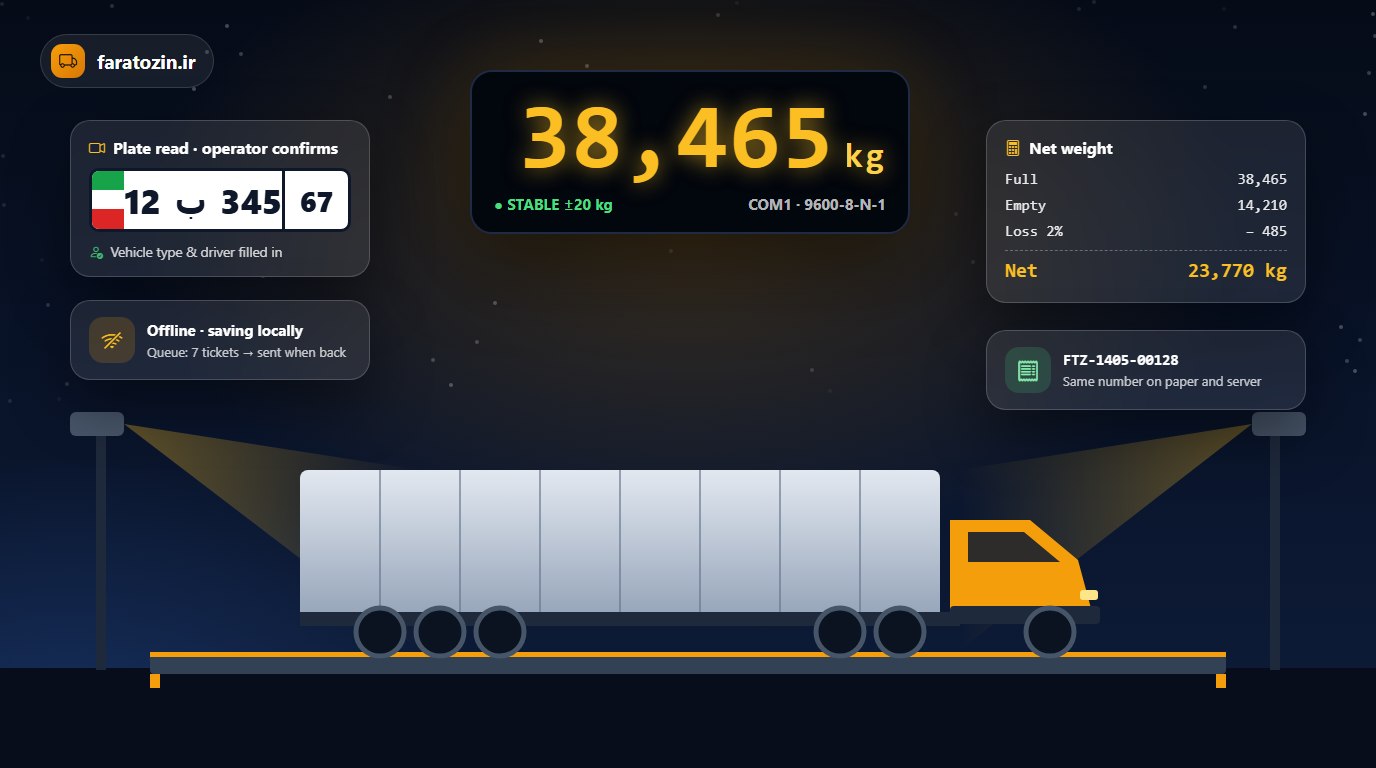
It’s harvest season. The queue of trucks outside the plant reaches the road, each carrying forty tonnes, and the weighbridge operator is issuing tickets non-stop. Suddenly the internet drops and the software freezes. Someone types a weight by hand, and nobody knows who or why. At the end of the month the paper ticket doesn’t match the system.
On a weighbridge every kilogram is money. A one-percent error on a forty-tonne truck is four hundred kilograms; multiply that by the trucks on a busy day. Weighbridge software isn’t a simple data-entry form — it is the lock on the plant’s safe. So before choosing one, ask these ten questions.
At a glance: FaraTozin
- A weighbridge terminal that keeps working without the internet and sends tickets to the server later, with no duplicates.
- Continuous weight reading from the scale indicator, with a “stable / unstable” status.
- Manual weights only with a permission and a reason; ticket edits only by request and approval.
- Two cameras at both ends of the deck and plate-reading assist, with the operator having the final word.
- FaraERP’s weighbridge module: a daily report, Excel and PDF export, and a weighbridge card on the executive dashboard.
Ten questions before you buy weighbridge software
1. If the internet goes down, does the weighbridge stop?
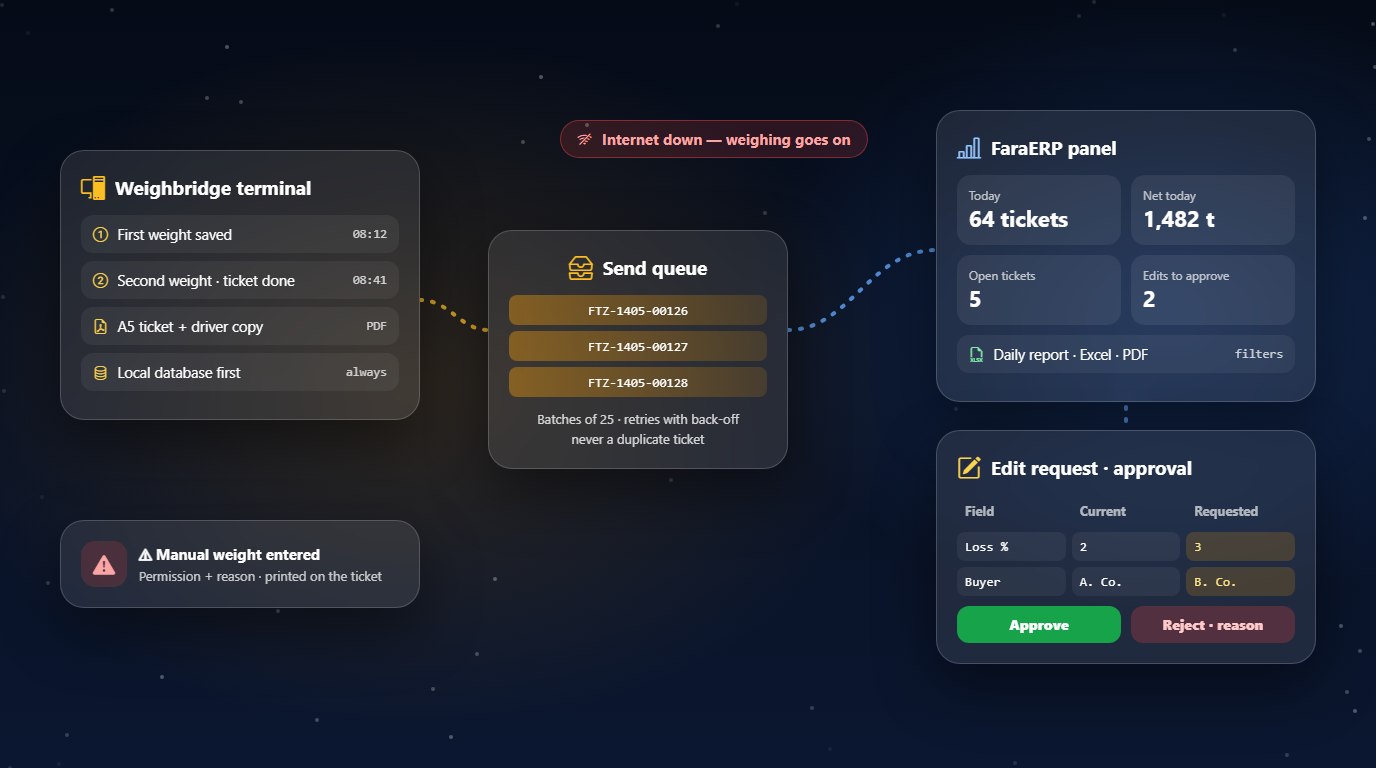
FaraTozin’s rule is simple: an internet outage must never stop the weighbridge. Every ticket is saved first in the local database on the weighbridge PC and waits in a send queue until the connection returns, then goes to the server in order and in batches. Each ticket carries a unique key, so re-sending never creates a duplicate. Operators can even sign in without the internet.
2. Where does the weight come from, and can you trust it?
The terminal reads the indicator’s continuous weight stream over a serial port, and the port settings are fully configurable. A weight is “stable” when it stays within ±20 kg for 1.5 seconds; if no data arrives for five seconds the status shows “no data”, and the connection re-establishes itself. And a smart rule: because weighbridges have a 5 kg graduation, a real reading always ends in 0 or 5, so any other trailing digit is the indicator’s status digit — one rule for every indicator model.
3. Who can enter a weight by hand?
Only someone with that permission, and only with a written reason. The user and the reason are stored and printed on the ticket itself as “⚠ manual weight entered”. Anonymous weights simply no longer exist.
4. How do you correct a ticket once it’s issued?
Through an edit request with a mandatory reason. The approver sees the changes side by side — “current” and “requested” values for product, parties, vehicle, weights, loss percentage and price — and approves, or rejects with a reason. Nobody can approve their own request, and if the ticket changes after the request was filed, the request is flagged as stale. The server also stops anyone from bypassing this path by simply re-sending a ticket.
5. Does the number on paper match the number in the system?
Each ticket number — station code, year and a five-digit serial — is created at the moment of saving on the terminal, even offline, and the server keeps it unchanged. So the paper ticket and the server report always show the same number. Each ticket is produced as a print-ready A5 file: a first-weight receipt, the full ticket, and a driver copy without the trading parties or prices.
6. What do cameras and plates do?
Two cameras at both ends of the deck show live video on the form, and the frames captured during a plate read are linked to the ticket on the same PC. When a truck drives on and the weight passes about 500 kg, plate reading starts automatically, on the local network with no internet needed. But the operator has the final word: a plate the operator typed is never overwritten, and if a read fails, the weight is already captured and only the plate is typed by hand. Plate reading is built for the Iranian plate format.
7. How are loss and load quality handled?
The heavier weight counts as “full” and the lighter as “empty”, whichever came first. The loss percentage — impurities, soil, moisture — is deducted to give the “final net weight”, the financial basis of the ticket, and changing the loss percentage needs its own permission. For loads such as tomatoes, the lab’s Brix value is shown on the form as well.
8. What does the manager see from the office?
In FaraERP’s weighbridge module: a daily report filtered by date and time, product, seller, broker, buyer, driver, edited tickets and manual weighings; the net-weight total copied in kilograms or tonnes with one click; and Excel and PDF export. The executive dashboard shows today’s and this month’s tickets and net weight and alerts on open tickets. Several weighbridges can run on one server, each with its own ticket-number prefix.
9. Do operators have to learn everything from scratch?
No. Keyboard behaviour deliberately matches the previous-generation terminal operators have used for years: Enter works as Tab, the field order is fixed, F-keys take the weight, save and print, and the keyboard language switches automatically per field. The form also fits any screen size without scrolling.
10. What if the licence expires or an update goes wrong?
You get a warning fifteen days before the licence expires, and even after that only new first weighings are blocked; second weighings, printing and sending keep working, so no truck is ever stuck on the scale. Updates are signed, install only with the user’s confirmation and roll back automatically if installation fails. For roadside weighbridges there is also a fully standalone, offline mode.
Switching without a minute of downtime
Changing weighbridge software mid-season is a nightmare — unless your history comes with you. FaraTozin has a tool that migrates the full ticket history of the previous-generation terminal and can keep it in sync during the changeover. At Beh Yek, a maker of tomato paste and pickles, the complete ticket history was sent to its FaraERP server, server and terminal matched exactly, and new tickets now flow live through the new sync engine. At Tabiat, the full history was migrated as well and verified on a test server with exactly matching weight totals.
To be honest: FaraTozin does not control barriers or RFID cards today, does not print directly to a printer (tickets are PDF files), does not send SMS to sellers or drivers, and does not create inventory or accounting documents automatically from a ticket. We don’t claim what we don’t have; what we do have works every day in real plants.
Why FaraTozin?
Because it was built from day one for that scene of truck queues and internet outages: a weighbridge that never sleeps, every weight with an owner, a ticket that is the same on paper and on the server, and a manager who knows what happened today without calling the weighbridge. And because it is part of FaraERP, people, vehicles and products are shared with the rest of the organisation.
Your weighbridge moves hundreds of tonnes a day. Its software should be built to the same scale. See FaraTozin (site in Persian) — or use the FaraERP demo button below.