
Importing Quantity Take-off from Excel into a Project Estimate: Your Own Measurement Sheet, No Retyping

The project's quantity surveyor has spent two weeks on the drawings and written every measurement in Excel: footings, ground beams, rebar, walls with door deductions. Now the estimate has to go into the software. In most systems that means another day of retyping, and a few small mistakes that show up later in a payment certificate.
In FaraERP's contract-projects module, that same Excel sheet goes straight into the estimate.
Where is it?
Contract projects → the "Take-off and estimate" tab → inside any draft estimate, the "Import measurements from Excel" box. "Download template" gives you a sample file and "Choose Excel file" takes your own sheet.
What should the sheet look like?
Much like the one you already write:
- One row per measurement line: rate-list item number, description or location, count, length, width, height, factor or unit weight; or a direct quantity, for example the output of another take-off tool.
- Rows without an item number: belong to the item above, as on any measurement sheet.
- Deduction rows: such as openings, are recognised by a "deduct" column, a description starting with the deduction word, or a negative number.
- Total rows: are ignored, so nothing is counted twice.
- Column names: Persian or English, in any order; Persian digits are read too.
An example
These three items come from the downloadable template:
- Footing concrete: 12 footings of 2.5 × 2.5 × 1.2 m plus 180 m of ground beam at 0.5 × 0.6; that is 90 + 54 = 144 m³.
- Rebar: 240 bars of 12 m at 1.58 kg/m; that is 4,550.4 kg.
- Walls: 2 walls of 30 m, 0.22 thick and 3.2 high, minus 4 doors, plus a direct 18.5 m³; that is 58.4168 m³.
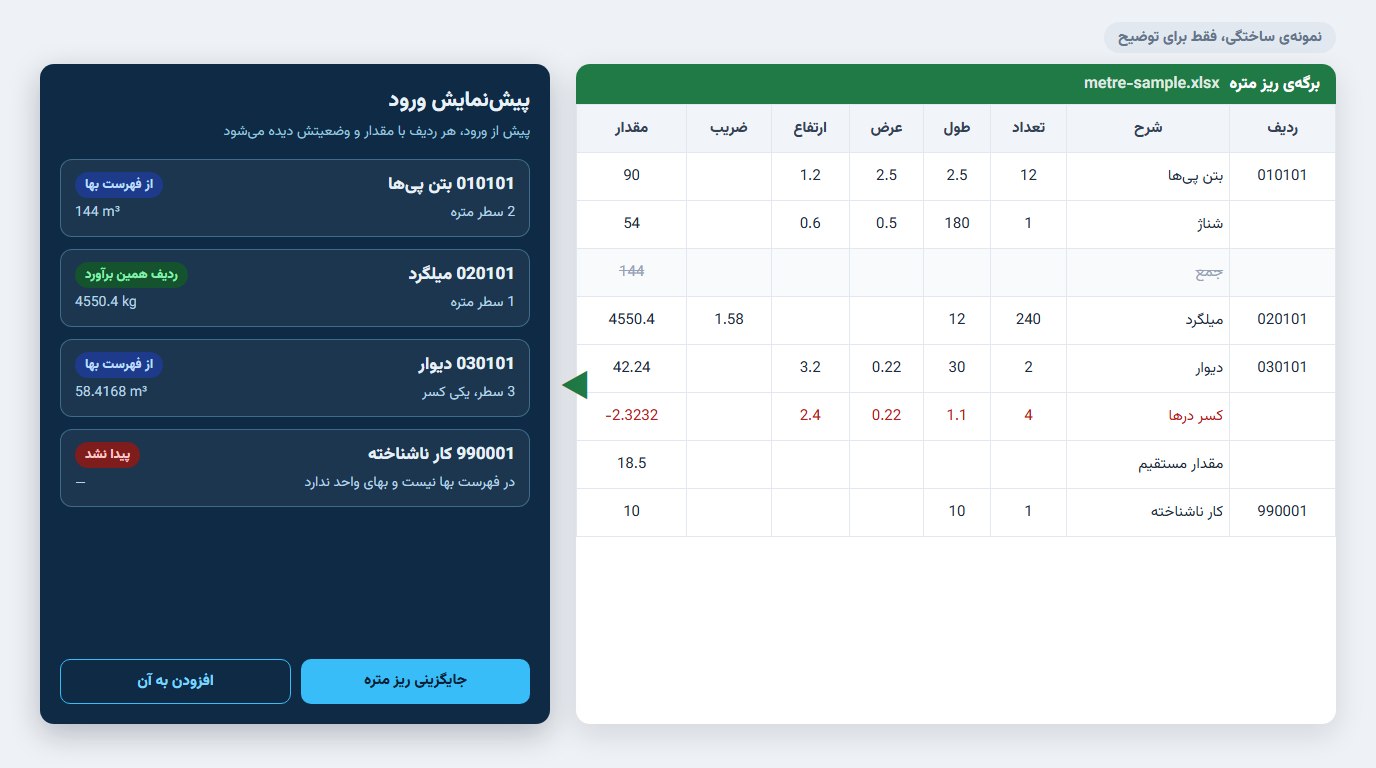
A preview before anything is imported
Nothing goes in unseen. Before importing, each rate-list item shows its number of measurement rows, quantity and amount, with one of these statuses:
- "Item in this estimate": the item exists and the measurements are added or replaced.
- "From the rate list": the item is taken from the rate list and added to the estimate.
- "Starred": the file itself gave the description and unit rate.
- "Not found": it is not imported, and the reason is shown.
Import and automatic updates
- Replace or add: choose whether to replace the existing measurement rows of each item or add to them.
- Everything updates: each item's quantity and amount, chapter totals, overhead and regional factors, and the comparison with contract amounts.
- Final estimates are protected: a finalised estimate refuses imports.
From take-off to price adjustment and project profit
An estimate in FaraERP is more than one number. Its chapter weights can drive automatic price adjustment from indices on a contract, and the estimated total cost on the project P&L page comes from the same estimate. So the measurements you import today show up tomorrow in certificate price adjustments and the forecast margin. For the whole module, read ERP for construction companies: 10 demo questions.
Honestly: automatic take-off from CAD or BIM drawing files is not there yet; measurements are made in Excel, or any take-off tool with Excel output, and imported. Rows imported from Excel carry no drawing reference; if needed, the drawing for each row is picked later in the panel.
Bring your own measurement sheet to a FaraERP demo and watch it go into an estimate. See our ERP demo guide and request a demo.