
Real employee? Genuine product? MyDetails answers in one scan
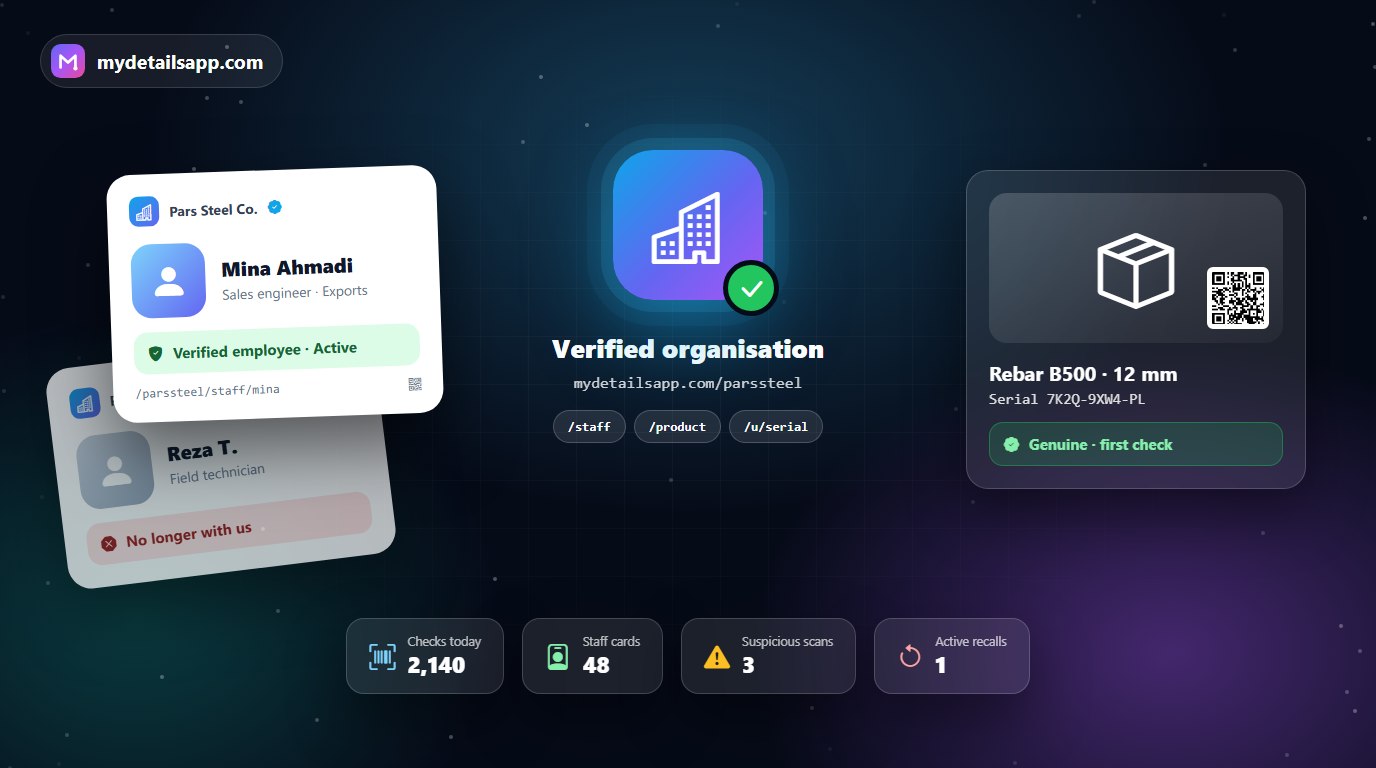
Three scenes your organisation may know too well: a man with your company’s business card visits a customer, takes a deposit and vanishes. At the market, a product with your logo sells at half price — and it never came off your production line. And a technician who left months ago still rings people’s doorbells in your uniform with your ID card.
All three share one root: the customer has no way to tell, on the spot, what is real. The MyDetails organisation plan builds exactly that way — a verified digital identity for your organisation that anyone can check with a phone camera, without installing anything.
At a glance
- Your organisation is verified once, carefully; after that, staff and product pages publish without a review queue.
- Every employee gets a digital card with a QR code that shows their real status: active, left or revoked.
- Every product has an official page, and every production batch its own QR code.
- Every unit can carry a unique serial and a six-digit scratch-off PIN.
- A recall appears instantly, on the very QR code the customer scans.
1. First, the organisation is verified — once, but seriously
Trust starts at the top. Your organisation registers with its company registration number, official documents and the identity of its representative, and an administrator reviews them. Once verified, the organisation gets its own official page at its own address, such as mydetailsapp.com/parssteel.
From then on, staff cards and product pages publish under that address without waiting in a review queue. Instead of a queue, abuse reports and the administrator’s power to suspend an organisation guard the credibility of the whole system.
2. Staff cards that don’t lie
For each employee — sales rep, field marketer, technician, driver or specialist — you create a digital card under /staff/ and print its QR code on their ID badge, business card or uniform. Before opening the door or paying, the customer scans the card and sees: this person really is an active employee of this organisation.
The day someone leaves, you mark their card “left” or “revoked”, and from that moment every scan shows it; a card that was never registered shows “not registered”. The public staff list is off by default, to protect your team’s privacy.
3. Official product pages and a QR code for every batch
Every product has its official page under your organisation’s address, and every production batch can have its own page and QR code. The printed QR is a short, random address, so it fits even on a small label. Scanning it takes the customer straight to the official page of that product and that batch — not to a website a counterfeiter built.
4. A unique serial for every unit: your main weapon against counterfeits
This is where the game changes. For each batch you generate up to five thousand unique serials per run and attach one to each unit. You can add a six-digit scratch-off PIN to every serial; the PIN is shown to you only once, in the downloaded file, and the system keeps only a cryptographic fingerprint of it.
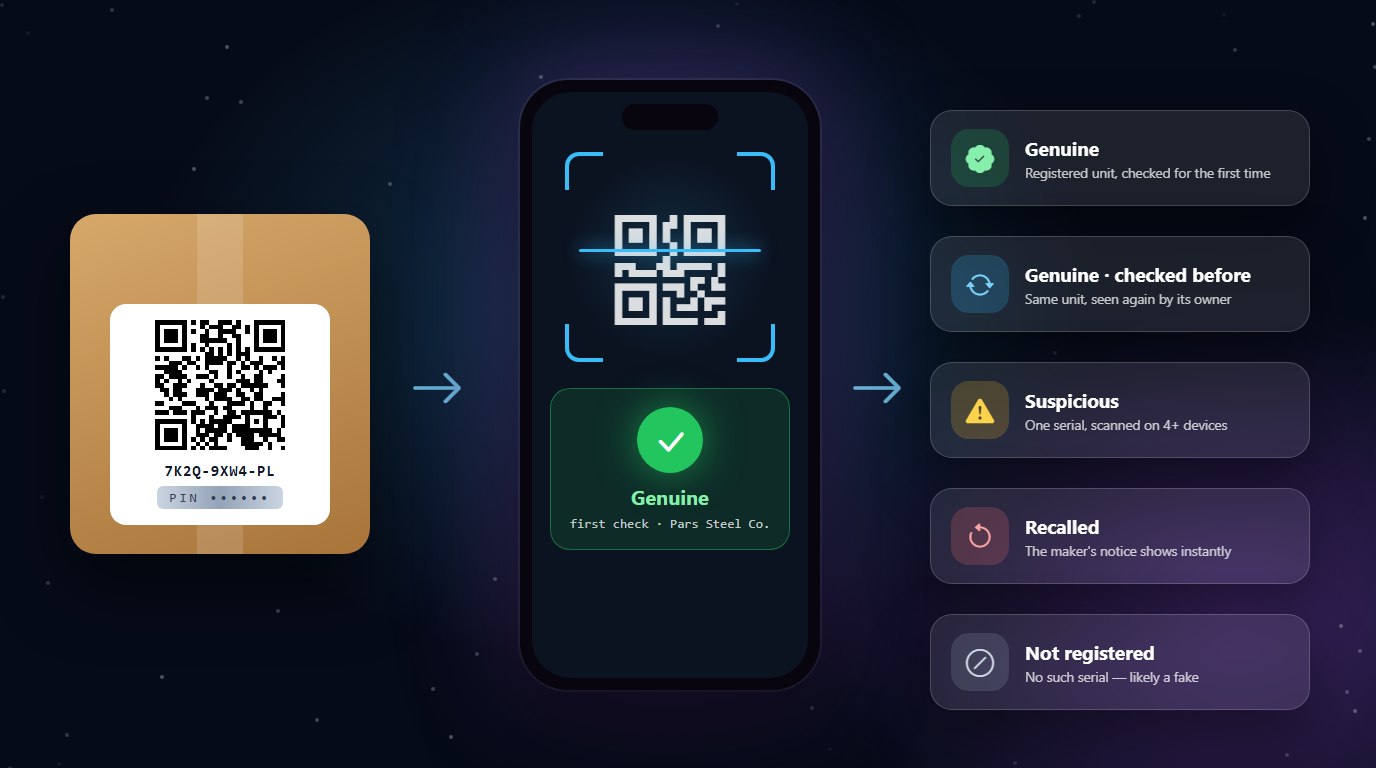
When a customer scans the serial, they get a clear verdict:
- Genuine, first check: this unit is registered and is being checked for the first time.
- Genuine: the same unit, checked before.
- Suspicious: one serial scanned on four or more devices — a sign the label has been copied.
- Claimed by someone else: another person has already registered this unit as theirs.
- Void or recalled: the serial has been taken out of circulation, or the product has been recalled.
Only a real check from a browser counts; link previews in messaging apps don’t skew the numbers. A counterfeiter who copies one label hundreds of times is quickly exposed by the “suspicious” verdict.
5. Instant recalls, without the noise
If a batch has a problem, you don’t have to wait for news coverage. You register the recall on that batch, and anyone who scans its QR code sees the recall notice — even if your organisation plan has lapsed in the meantime.
6. Credibility that outlives your subscription
A label you print today stays on the product for years. That is why serials keep verifying after a subscription ends, revoked and former-employee cards keep showing their status, and recall notices stay in place. The only exception is an organisation suspended for abuse.
7. Every scan is a meeting with your brand
Whoever scans your product lands on your organisation’s official page: they see your other products, find your official contact channels and come away trusting your brand more. Like every MyDetails page, the organisation page is rendered on the server, readable by Google and can have versions in seven languages — a real advantage for organisations that export.
Who gains the most?
- Manufacturers of food, cosmetics and personal care, spare parts, building materials and any product that gets counterfeited.
- Distribution and sales companies with field reps and travelling agents.
- Service companies whose technicians visit customers’ homes or workplaces.
- Clinics, schools and event organisers whose staff and teachers need to be identifiable.
How to start
- Create an account at mydetailsapp.com and register your organisation with its documents.
- Once the organisation is verified, activate one of the organisation plans.
- Create staff cards and product pages, then generate and print serials for each batch.
- Teach your customers to scan before they buy or pay.
Counterfeiters count on one thing: that the customer has no way to check. MyDetails ruins that calculation. Build your organisation’s digital identity today.